Add a New Message
| Screen ID: | n/a | 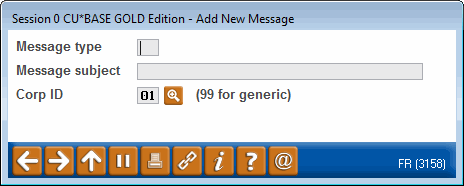
|
| Screen Title: | Add a New Message | |
| Panel ID: | 3158 | |
| Tool Number: | 497 | |
| Click here to magnify |
Access this screen by clicking Create or by selecting "Copy" from the Message Maintenance screen (Credit Union message library).
This screen is the first screen you come to when you create a message yourself instead of copying a message from the Member Connect Master message library, or you can use this screen to add additional text from a message that is already created in the credit union message library.
Field Descriptions
|
Field Name |
Description |
|
Message Type |
Enter a two digit code to identify your message. Letters or numbers can be used.
|
|
Message Subject |
This text will appear in the subject line when this message is sent as an email message. |
|
Corp ID |
If Corp IDs are used, enter the Corp ID in this field. |