G/L 3-Year Balance Comparison
| Screen ID: | IGLBGT5-02 | 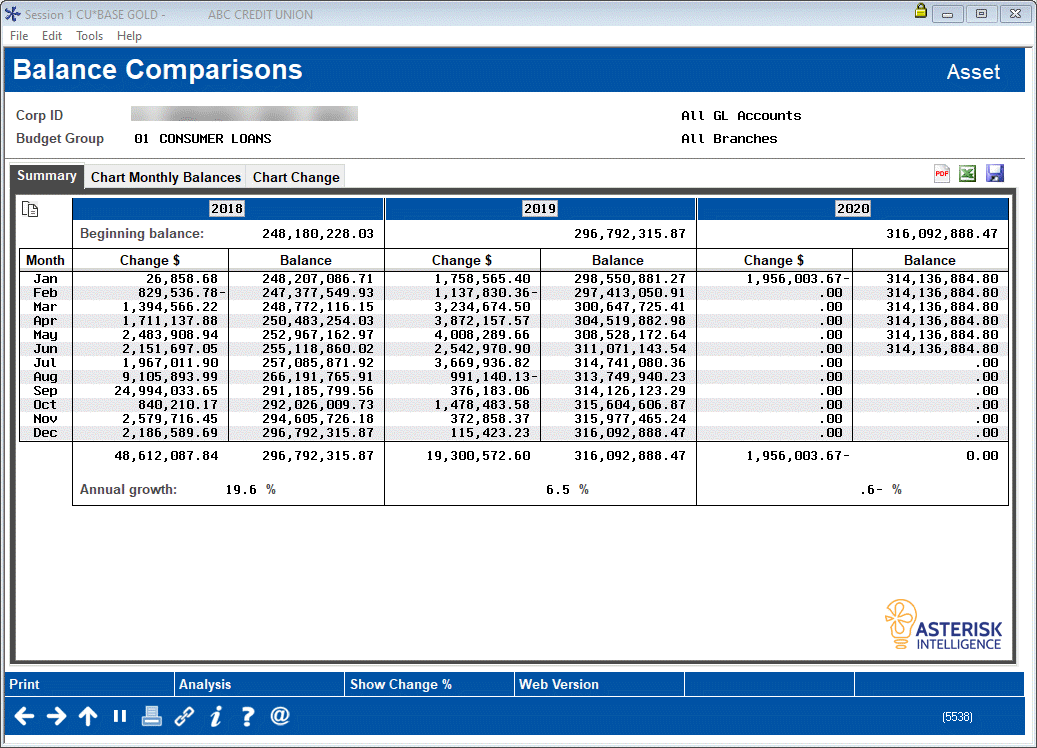
|
| Screen Title: | Balance Comparisons | |
| Panel ID: | 5538 | |
| Tool Number: | 1018 | |
| Click here to magnify |
This screen appears after making selections on the initial Balance Comparison Selection screen. It will also appear after using the lookup button on any budget year on the 10-Year Trends by GL Account Dashboard.
- SEE ALSO: Budgeting with CBX
This screen displays balances over time for the G/L(s) selected on the previous selection screen. If viewing asset or liability accounts, you’ll see a beginning balance and calculated annual growth for each of the three years, representing the rate of growth from January 1 to December 31 of that year.
The Change $ column shows the dollar amount increase from one month to the next within that same year. Use Show Change to toggle the Change $ columns to show percentage increase (or decrease) instead.
To see some summary statistics for each of the three years, such as average monthly balances and the like, use Analysis to display the Balance Comparison Analysis screen.