Name and Address Listing (4)
|
Screen ID: Screen Title: Panel ID: Report Name: |
LMBRNS-04 Name and Address List Selection 4614 LNBRN1, LMBRNX |
|
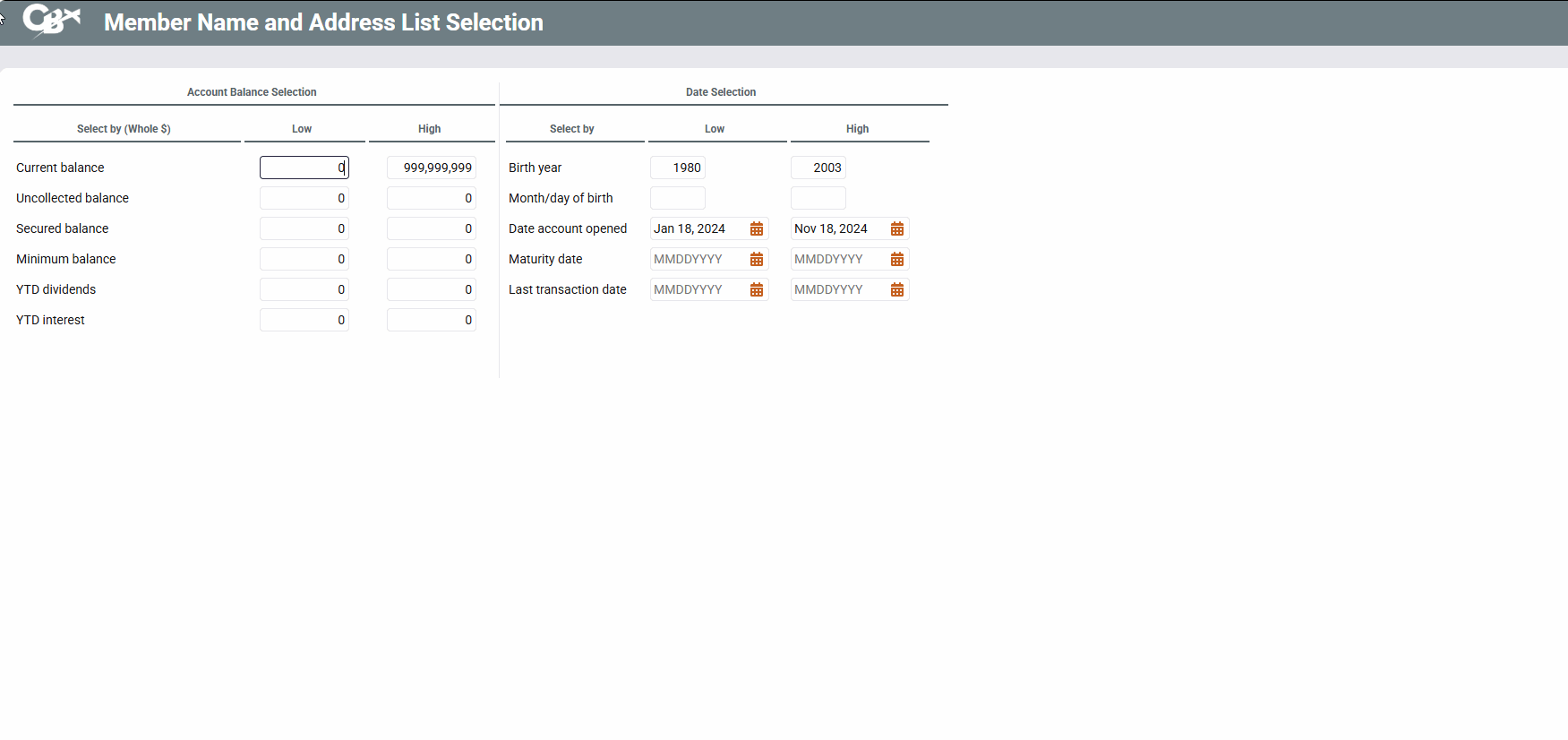
Access this from the third name and address listing screen
This screen is used to specify which members should be included on the results based on account balance parameters or miscellaneous date parameters.
-
In many cases, these criteria will not work unless you choose an appropriate Application type setting on the General Account Criteria screen. (See below for specific instances where this is true.) Also, depending on the types of accounts you have already selected on previous screens, some of these parameters will not even apply. (For example, if including only members with checking accounts, the Maturity Date setting is irrelevant.)
How Do I Save/Retrieve My Report Settings?
This report can be used with the “Report Scheduler,” a time-saving automation feature that allows you to select and save the filters you use to run several commonly used reports and then set these reports to be run automatically by our operations staff on the first of the month. Or you can save the settings and run them manually by yourself at any time. To learn more refer to the first selection screen.
When ready, press Enter to proceed to the next screen.
|
Field Name |
Description |
|---|---|
|
Account Balance Selection For these fields, specify both a low and high amount to include only members whose balances fall within those ranges. |
|
|
Current balance |
To include members with a certain balance range, from the current balance field (CURBAL) on the MEMBERx account record.
|
|
Uncollected balance |
To include members with a certain amount in the Uncollected field (UNCOLL) on the MEMBERx account record (savings and checking accounts only). In order for this to work properly, an Application Type of IR, SHor SD must be entered on the General Account Criteria selection screen. |
|
Secured balance |
To include members with a certain amount in the Secured field (SECBAL) on the MEMBERx account record (savings and checking accounts only). This contains both Misc. Secured Shares and shares pledged toward a loan. In order for this to work properly, an Application Type ofSH, SD, CD, IR, or TXmust be entered onthe General Account Criteria selection screen. |
|
Minimum balance |
To include members with a certain amount in the Minimum balance for dividend period field (MINBAL) on the MEMBERx account record. In order for this to work properly, an Application Type ofSH, SD, IR, or TXmust be entered onthe General Account Criteria selection screen. |
|
YTD dividends |
To include members that were paid a certain amount of dividends on share accounts during the current year. This looks at a total of the four quarterly dividends paid fields (DIV1, DIV2, DIV3 and DIV4) on the MEMBERx record. In order for this to work properly, an Application Type ofSH, SD, CD, IR, or TXmust be entered onthe General Account Criteria selection screen. |
|
YTD interest |
To include members where YTD interest paid on loans falls within this range. This looks at the YTD Interest (ANNINT) field on the MEMBERx record. In order for this to work properly, an Application Type ofLNor OC must be entered on the General Account Criteria selection screen. |
|
Date Selection For these fields, specify both a low and high date to include only members whose accounts fall within those date ranges. |
|
|
Birth year |
To include only members born during certain years, based on the Birth year field (BRTHYR) on the MASTER record.
|
|
Month/day of birth |
To include only members born during a certain month/day range. For example, if you want to include all members born in January, enter 01 and 01 in low fields and 01 and 31 in the high fields.
|
|
Date account opened |
To include only members with an account opened during a certain date range (looks at the date on the MEMBERx record). This should generally be used in conjunction with a selection on the previous screen to define a dividend application, certificate type, or loan category. Otherwise the system will include the member if any of his or her accounts were opened within this period. |
|
Maturity date |
To include only members with a loan or certificate. That has a maturity date within a certain date range. In order for this to work properly, an Application Type ofCD, LN, or OCmust be entered onthe General Account Criteria selection screen. |
|
Last transaction date |
To include only members with any account that shows a last transaction date within a certain date range (looks at the date on the MEMBERx record). This should generally be used in conjunction with a selection on the previous screen to define a dividend application, certificate type, or loan category. Otherwise the system will include the member if any of his or her accounts with last transaction dates within this period. |