Updating Membership and Account Reason Codes
|
Screen ID: Screen Title: Panel ID: |
UACTCD-01 Maintain New/Closed Reason Codes 1614 |
|
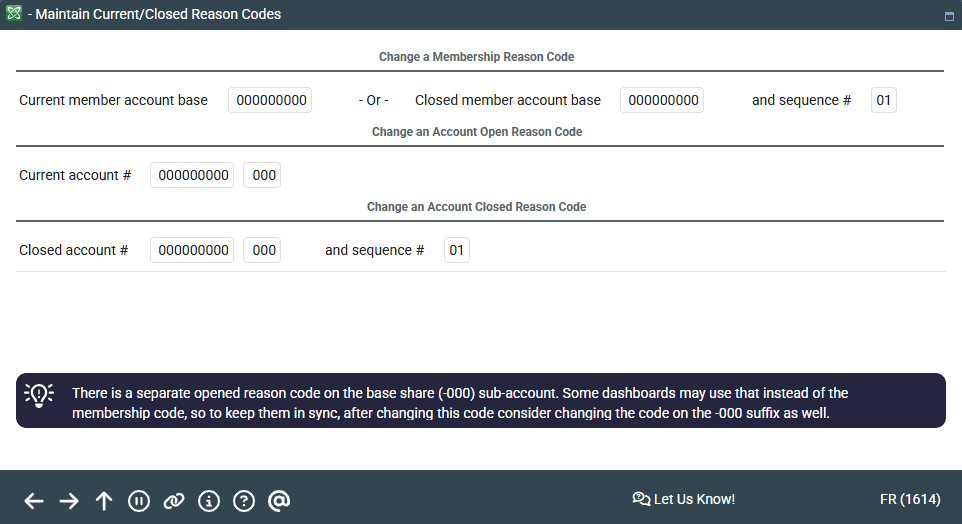
Access this screen by selecting Tool #902 Update Membership/Account Reason Codes.
Where is Reason Code data stored in the core?
This screen is used to change a Reason Code that has been recorded on a membership or account.
-
To change a Membership Reason Code - enter either an account base for a current membership (MASTER), or an account base and closed sequence number for a closed membership (MSHIST).
-
To change an Account Reason Code - enter either an account base and suffix for a current account (MEMBERx), or an account base and suffix and closed sequence number for a closed account (ACHISTx).
Press Enter to refresh the screen. The previous reason code, if any, will be displayed. Simply enter the correct reason code (click the lookup button  to see a list of your credit union's configured codes) and press Enter to save.
-
Note that there is a separate opened reason code on the base share (-000) sub-account. Some dashboards may use that instead of the membership code, so to keep them in sync, after changing this code consider changing the code on the -000 suffix as well.
-
To look up the sequence number for a closed membership, use Closed Members available from the initial Member Inquiry search screen. To look up the sequence number for a closed account, access the membership as usual in Member Inquiry, then use Closed on the main Member Inquiry screen.