Update Credit Union e-Alert/e-Notice Settings
| Screen ID: | UCUEAL-01 | 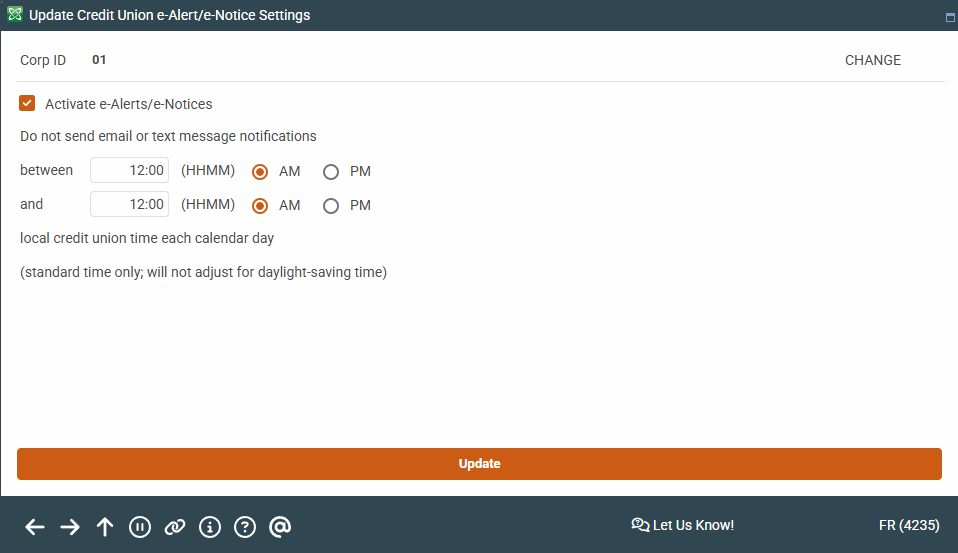
|
| Screen Title: | Update Credit Union e-Alert/e-Notice Settings | |
| Panel ID: | UCUEAL-01 | |
| Tool Number: | 569 | |
| View full-size screen |
Access this screen by selecting "e-Alerts/e-Notices" on the Online Banking/Mobile Configuration screen and using Select.
Screen Overview
By checking the eAlerts/eNotices checkbox you can activate the e-Alerts feature so that members can sign up for e-Alerts while in online banking. Checking this checkbox also activates e-Notices. You cannot activate one of these features without the other.
-
You can also configure a black out period when emails and text messages (which can be requested by the member) are not sent. This is local credit union time and does not adjust for daylight savings time. If you wish to adjust for this period of the year, simply re-enter this screen and change the configured hours for the block out.
When done here, use Update to save your changes and return to the Home Page. Or use the backup arrow to return to the previous screen.
Related Resources
For more information about activating e-Notices refer to Member Notices: Configuring and Printing CD Defined Notices.
For more information on e-Alerts refer to the E-alerts booklet.