Configuring Loan Collateral Agent Codes (1)
|
Screen ID: Screen Title: Panel ID: Report Name: |
UINSURFM-01 Insurance Agent Maintenance 6280 UINSUR |
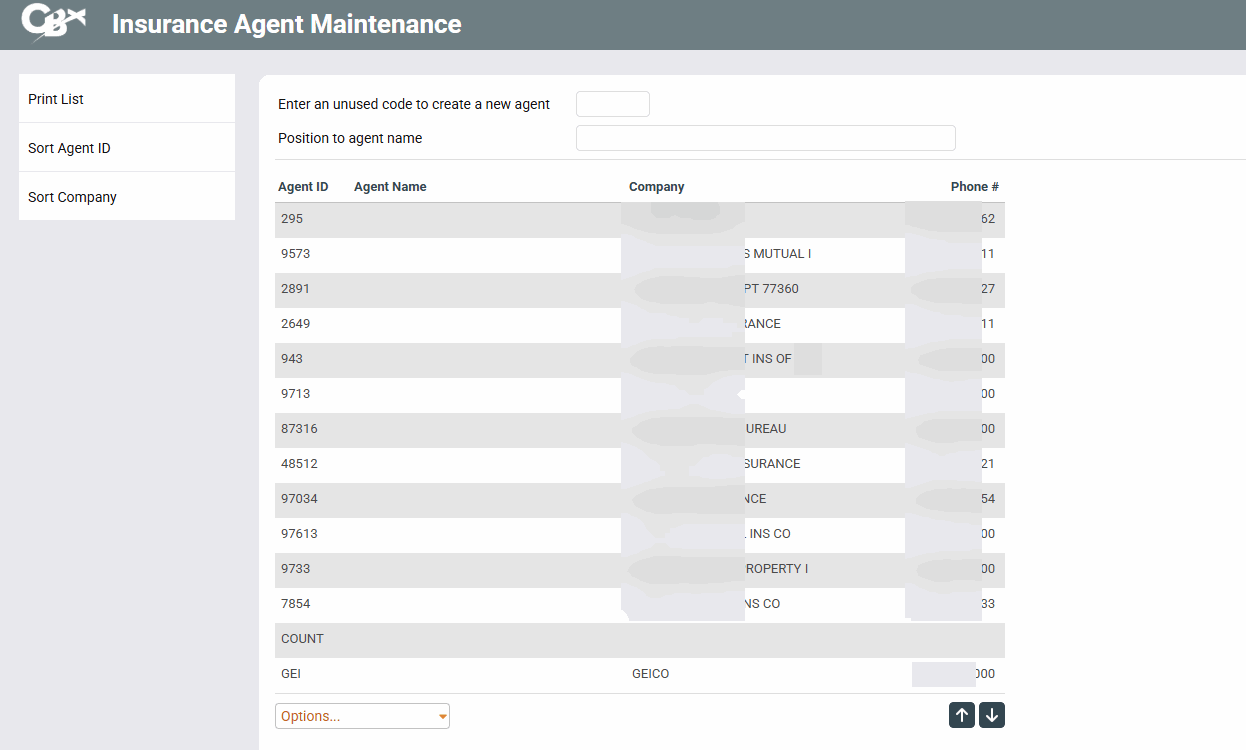
Access this screen by selecting Tool #222 Collateral Insurance Agent Configuration.
Screen Overview
This is the first of two screens used to set up Collateral Insurance Agent Codes. These codes are used when setting up a collateral record for a loan, to specify the insurance company which insures the collateral property (such as the fire and hazard insurance carrier for a member with a mortgage loan).
Use the function keys to the left to sort by agent ID, agent name, or company. Use Print List to print a list of agents alphabetically by Agent ID.
To create an insurance agent code, enter any unused five-character numeric or alphanumeric code and use the forward arrow (Enter) to proceed to the second screen.
To modify an existing code, either enter the code manually in the field at the top of the screen, or select the item in the list and press Enter or click Change (or double-click on the item) to proceed to the second screen.
-
If this screen was displayed after clicking the lookup button on the Collateral creation screen, select the item and click Select to choose the agent ID and return to the collateral screen.
To view agent information without modifying it, select the item in the list and click Display.
Report Sample
