Abnormal Activity Monitoring - Setting Up Origin Groups
| Screen ID: | UMTAAC-03 | 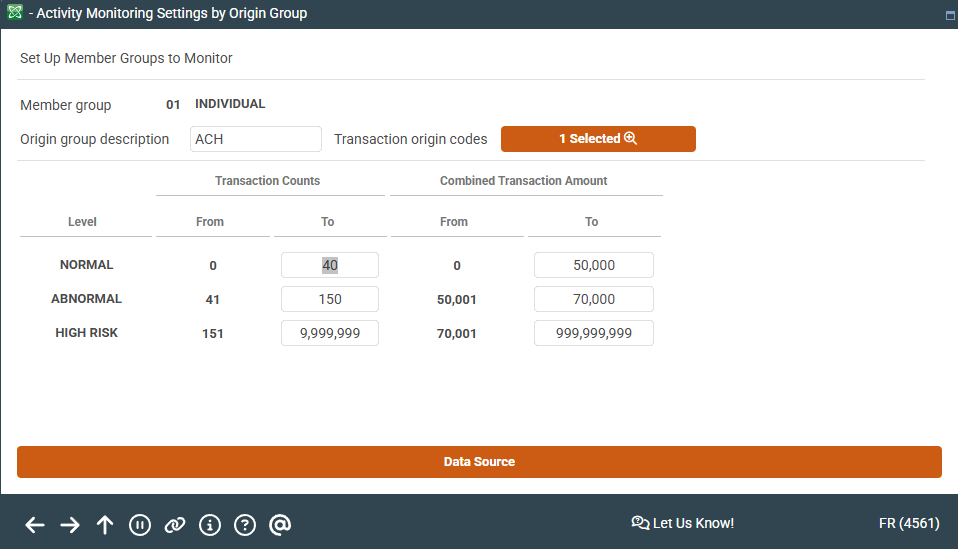
|
| Screen Title: | Activity Monitoring Settings by Origin Group | |
| Panel ID: | 4561 | |
| Tool Number: | 101 | |
| View full-size screen |
Access this screen by selecting Add Origin Group on the previous screen.
Using this Screen
Use this screen to configure transaction numbers and dollar amounts for an Origin group.
Field Descriptions
|
Field Name |
Description |
|---|---|
| Member Group | The member group number is automatically assigned by the core and represents the number of member groups set up for your credit union. If a member group is deleted, CBX will reuse the old number, and the next member group created will be assigned that old number. The group name is assigned by your credit union. |
| Origin group description | The name you’d like to give the Origin group/transaction type(s) you’re adding to your member group |
|
Transaction origin codes |
Allows you to select the Origin code(s)/transaction type(s) you’d like to include in your Origin group |
|
Transaction Counts |
The number of transactions you would consider normal, abnormal, and high risk for your member group |
|
Combined Transaction Amount |
The combined transaction dollar amount you would consider normal, abnormal, and high risk for your member group |