Loan Product Configuration: Select Insurance or Debt Protection
| Screen ID: |
UPCCFG-13 |
|
| Screen Title: |
Loan Product Configuration Options |
|
| Panel ID: | 5972 | |
| Tool Number: | 470 | |
| View full-size screen |
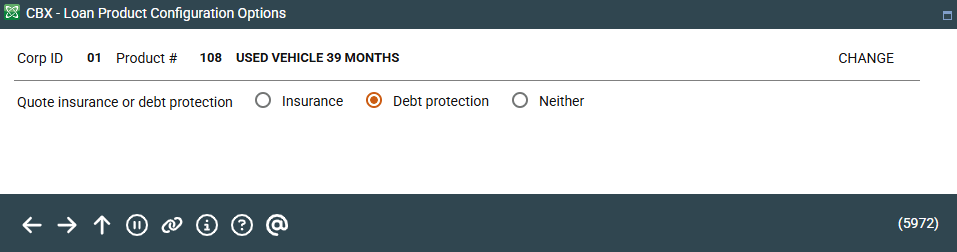
Access this screen while adding insurance or debt protection to a loan product configuration. This is also accessed by selecting "Insurance/Debt protection product selection" on the Loan Product Configuration Options screen.
Use this screen to select one of the following options:
-
Select Insurance and press Enter to automatically quote insurance premiums options when processing a new loan request. You will advance to the following screen, where you can define which of your configured insurance premiums codes will be shown as options when processing a new loan request. Changes can be made at the time the request is created.
-
Select Debt protection and press Enter to automatically quote debt protection premiums options when processing a new loan request. You will advance to the following screen, where you can define which of your configured insurance premiums codes will be shown as options when processing a new loan request. Changes can be made at the time the request is created.
-
Select Neither and press Enter to return to the Loan Product Configuration Options screen or the next screen in the new loan product configuration. (This varies according to selections made on the first loan product screen.) In this case, no insurance or debt protection options will be automatically quoted when processing a loan request.