Share Draft/Checking Processing Configuration
|
Screen ID: Screen Title: Panel ID: |
USDRFT-01 Check Processing Configuration 2750 |
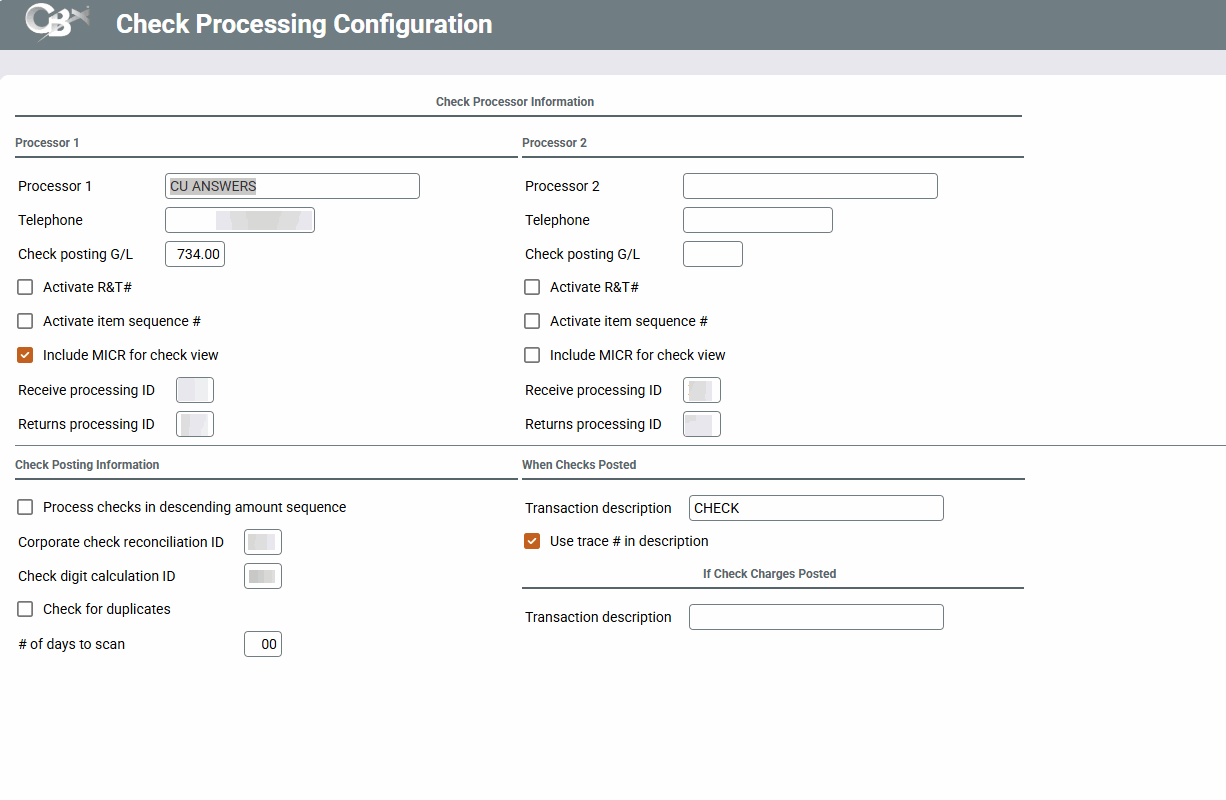
Access this screen by selecting Tool #510 Member SD/Checking Configuration.
This configuration is necessary in order for share draft/check receipt and posting to occur. It contains basic information regarding the Item Processor and allows for up to two different processors to be handled at once.
Field Descriptions
|
Field Name |
Description |
|---|---|
|
Draft Processor Information |
|
|
Processor 1 |
Enter the name of your credit union's first (or second) Item Processor. |
|
Telephone |
(Informational only.) Enter a contact phone number for the Item Processor. |
|
Check posting G/L |
Enter the general ledger account number to be used as the offset for draft postings. To make balancing and adjustments easier, we recommend using a settlement G/L account rather than the actual bank. |
|
Activate rtg/trn # |
This feature is not used. It should be left unchecked in all cases. |
|
Activate item sequence # |
This feature is used when a credit union's item processor is the Federal Reserve, which uses an item sequence number to identify individual drafts instead of a tracer number. If this is set checked, both transaction history and the Exceptions/Returns File report will display the Item Sequence Number in place of a tracer number. |
|
Include MICR for check view |
This flag is used by credit unions that use a third-party check processor that requires the MICR line in order to view cancelled check images in online banking. If checked, when a check clears the system will write out a secondary description on the transaction record containing the MICR. |
|
Receive processing ID |
This ID determines which program is used when receiving incoming draft files from this processor (such as XX for the generic receive program, EM for Empire, or a credit union ID for a custom program). |
|
Returns processing ID |
This ID determines which program is used when sending returns for this processor (such as XX for the generic receive program, EM for Empire, or a credit union ID for a custom program). |
|
Posting Information |
|
|
Process drafts in descending amount sequence |
This flag is used when multiple drafts are presented on the same day. If this flag is checked, the largest draft will post first, then the next largest, and so on down to the smallest amount. (This is used if you want large items such as mortgage payments to be posted before smaller, presumably less critical items.) If left unchecked, drafts will be posted starting with the smallest amount and working up to the largest amount. (This method allows the maximum number of individual items to clear if an account does not have enough funds for all of them.) |
|
Corporate check reconciliation ID |
This ID determines which program is used for handling automated check reconciliation processing (such as XX for the generic program or a credit union ID for a custom program). |
|
Check digit calculation ID |
This ID represents the custom program used to calculate check digits when opening new share draft/checking accounts in CBX (such as XX for the generic program or a credit union ID for a custom program). |
|
Check for duplicates |
Credit unions whose item-processing vendor does not support suspect-duplicate detection of incoming share drafts can configure CBX to flag these suspect duplicates for review. Contact your item-processing vendor to confirm whether your vendor already supports suspect-duplicate detection for share drafts. (CU*Answers Item Processing provides their clients with suspect detection for incoming share drafts for the previous 30 days.) Once activated, suspect duplicates appear as exceptions on the Share Draft Exception Screen with the “suspect duplicate” code - 30. (These suspect duplicates also appear on the “Potential Duplicate Records in Incoming Draft File” report (CKDFTDUP) that is generated when the share draft file is received (once the feature is activated). To be considered suspect duplicates, checks must match all of the following: check number, amount, and account number (base and suffix). Read more about the handling of suspect duplicates on the Share Draft Exception Screen. |
|
# of days to scan |
This field sets the number of days that the “Check for duplicates” (see field above) scans for suspect duplicates for incoming share drafts. It is recommended that you enter 30 in this field. |
|
When Drafts Posted |
|
|
Trans description |
Use this to specify a transaction description to appear in transaction history and on member statements when a share draft/check posts to a member account. |
|
Use trace # in description |
Use this to specify whether or not the tracer number should be included as part of the transaction description. |
|
If Check Charges Posted |
|
|
Trans description |
This field is no longer used. It was previously for item processors that sent records for check charges along with the draft clearing file. |