Printing Credit Union System Configuration Settings
| Screen ID: |
LSYSC-01 |
|
| Screen Title: |
System Control Attributes Listing |
|
| Panel ID: | 888 | |
| Tool Number: | 689 | |
| Report: |
LSYSC |
|
| View full-size screen |
Access this screen by selecting Tool #689 Print System Config, Trans Code/Origins.
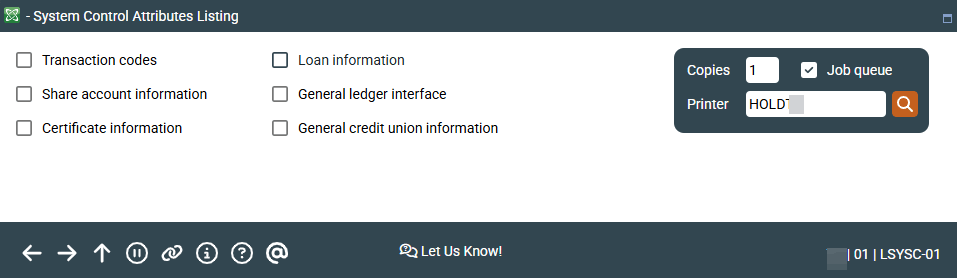
Everything you ever wanted to know (and then some!) about the configuration settings used by CBX for your credit union, can be found using this feature. There are six different reports that can be generated, each showing a set of configuration settings for different areas on the system.
-
Most of these reports were designed to be generated one at a time. Therefore, for the best results, choose Yes on only one of the options, returning to this screen as often as needed until all desired reports have been printed.
Field Descriptions
|
Field Name |
Description |
|---|---|
|
Transaction Codes Click for sample |
Choose Yes here to print a listing showing all current Transaction Codes and Transaction Types used by CBX when recording member transaction activity. |
|
Share account information Click for sample |
Choose Yes here to print a list of savings dividend applications and related configuration settings. |
|
Certificate information Click for sample |
Choose Yes here to print a list of CD application and type codes and related configuration settings. |
|
Loan information Click for sample |
Choose Yes here to print a list of loan category codes and related configuration settings. |
|
General Ledger interface Click for sample |
Choose Yes here to print a report showing which G/L accounts are used to interface with member products (including accruals), other back office features (such as ACH, ATM, share drafts, backup withholding), and configured Miscellaneous Receipts codes). |
|
General Credit Union information Click for sample |
Choose Yes here to print a report showing miscellaneous configuration settings for your credit union, including:
Any printer- or workstation-related information on this report is not complete and should not be relied upon as accurate. Use CU Hardware Configuration to view current configured printer and workstation devices. |
Report Samples


General Credit Union Information
Any printer- or workstation-related information on this report is not complete and should not be relied upon as accurate. Use Tool #326 CU Hardware Configuration to view current configured printer and workstation devices.
