Pre-Member Lending
| Screen ID: | NPLNAM-01 | 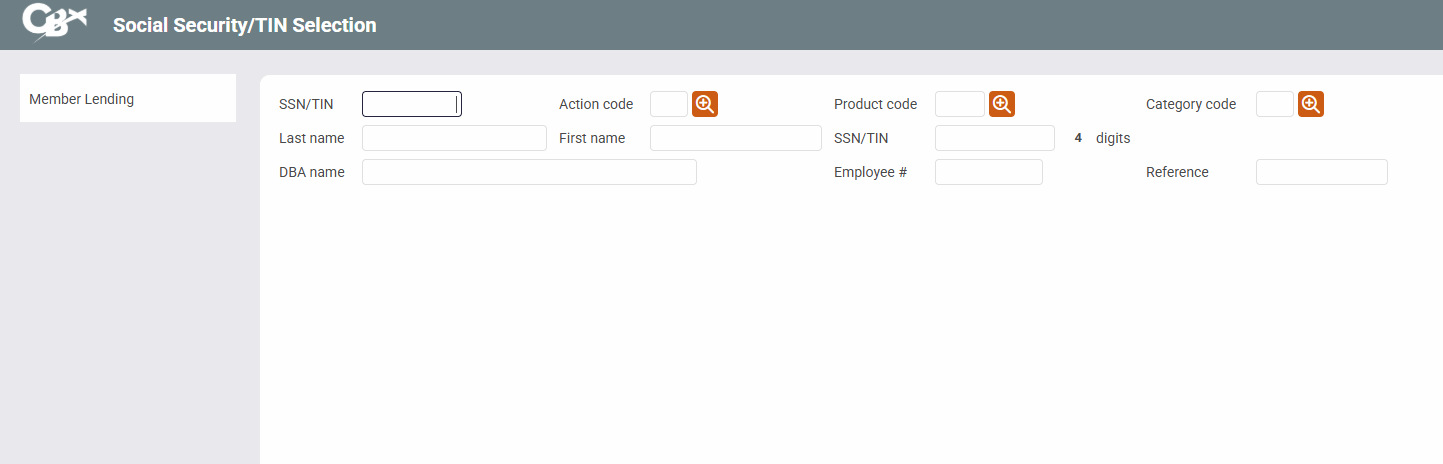
|
| Screen Title: | Social Security/TIN Selection | |
| Panel ID: | 5180 | |
| Tool Number: | Multiple | |
| View full-size screen |
Access this screen by selecting Pre-Membership Lending from the standard entry loan application screen.
Using Pre-Membership Lending
Loan Requests can be created for individuals who are not yet members of your credit union, using the CBX Pre-Membership Lending feature. Enter the non-member's Social Security or other tax ID number and proceed as usual.
If a non-member record does not already exist for the SSN/TIN entered, a window will appear requesting basic information about the non-member, including name, address, birth date, department/sponsor number, and corporate ID. Complete all fields and press Enter to create the non-member record, then proceed as with a normal member loan request.
Field Descriptions
|
Field Name |
Description |
|---|---|
|
SSN/TIN |
Enter the person's SSN or TIN. |
|
Action code |
This field is used to indicate which processing screen should be displayed next. If no code is entered manually, the Loan File/Action Codes window will display automatically. |
|
Product code |
If using the Loan Request (LR) Action Code, you must also enter a loan product code so that CBX knows where to find default values such as rates, checklists, marketing tips and procedures, etc. Click the lookup button |
|
Category code |
If using the Loan Request (LR) Action Code, you can narrow down the list of loan products by first choosing a loan category code (such as your general “Installment Loan” category) here. Click the lookup button |
|
Last Name SSN Reference |
These are search fields used to locate a specific account. After entering the desired search criteria, press Enter. A list of matching names will appear at the bottom of the screen.
|
 to see a list of your credit union's configured product codes.
Related Resources
Learn how to create a loan request for a non-member.
Pre-Membership Lending Overview