Denying a Loan or Other Service
|
Screen ID: Screen Title: Panel ID: |
UDNR-01 Statement of Denial, Termination, or Change 4360 |
|
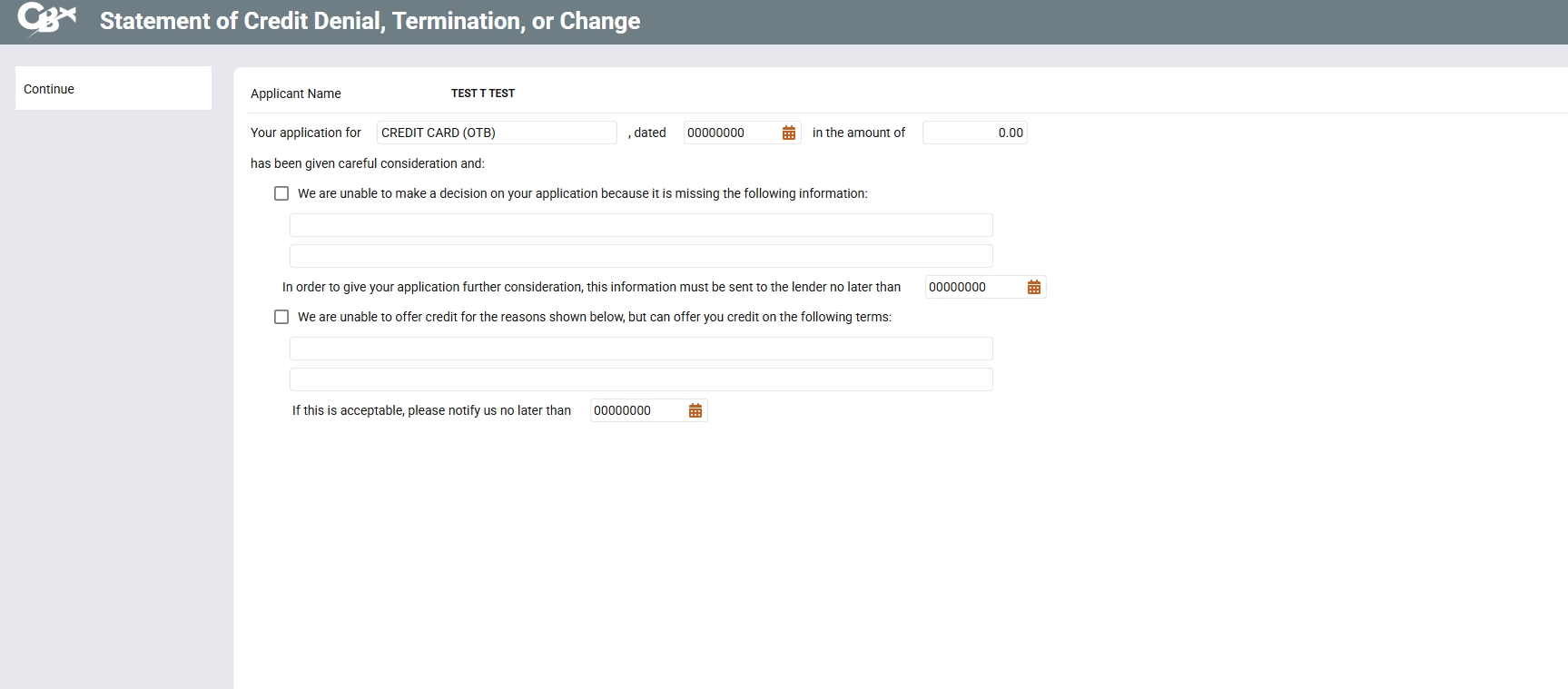
Screen Overview
This screen shows the first part of a three-part form used to generate a Notice of Denial for loans or for other miscellaneous member service needs. Once these screens have been completed, the system will generate a printed “Statement of Credit Denial, Termination, or Change” on your laser printer. This notice will contain the same verbiage as shown on these screens, with your selections and explanations filled in. Enter the text to “fill in the blanks” on the printed denial notice form. Place a checkmark and fill in the blanks wherever appropriate. Dates should be typed in the following format: MMDDYY. Press Enter (or click the Part 2 button) to proceed to the next screen.
Related Resources
Learn how to deny a loan request.
If creating a Member Service Denial Notice rather than a loan denial, the last portion of the first sentence (“Your application dated...”) will be replaced by the text entered in the Denial Notice Type Code configuration. For a sample printed form showing the placement of this text, refer to the booklet, Miscellaneous/Member Service Denial Notices.