Configure IRA Plan Settings
| Screen ID: | UIRAPT-01 | 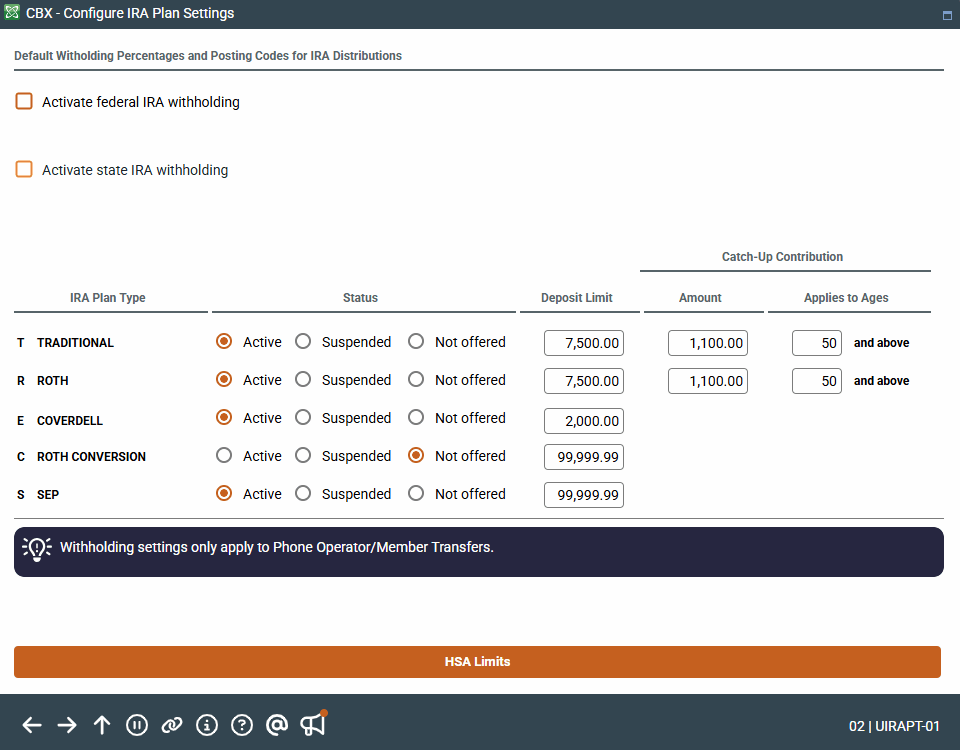
|
| Screen Title: | Configure IRA Plan Settings | |
| Tool Number: | 414 | |
| View full-size screen |
Access this screen by selecting Tool #414 Configure IRA Plan Settings.
This screen is used to activate IRA plan types so that a Dividend Application or CD Type can be configured for this IRA plan, and to set optional default tax withholding for IRA withdrawals made by transfer. For complete information refer to the IRA Processing booklet.
Plan Types must be activated before they can be used to set up products or accounts. This prevents an account from being coded with a plan type your credit union doesn't offer, which would cause problems with verification and reporting later.
Plan Types marked “Active” will be allowed when creating accounts and products. Plan Types marked “Suspended” may have existing accounts coded with that plan type, but no new accounts can be opened. Plan Types marked “Not offered” cannot be used when creating accounts or products.
The Deposit Limit shown for each plan type is used when the IRA Balance File is created, to indicate the maximum amount that can be deposited to the IRA plan during any given year.
For members that have multiple IRA plan types, the system will automatically combine deposits to Roth, Traditional and SEP plans and flag any that go over the limit.
Catch-Up Contributions
During year-end processing, CBX sets the new year's contribution limits on each member's IRA and HSA balance records. For members who meet the IRS age requirement for catch-up contributions, the system automatically adds the catch-up amount to their limit for Traditional and Roth IRA plans and HSAs. The new limits are in place on January 1 when the new tax year begins. CU*Answers updates the catch-up amounts each year based on IRS guidelines. The current catch-up amount and eligible age for each plan type are shown in the Catch-Up Contribution columns on this screen.
Balance file records created during the year, such as when a member opens their first IRA or HSA account, use the default contribution limit and do not include the catch-up amount. If an eligible member wants to make catch-up contributions that year, adjust their contribution limit manually using Tool #896 Update IRA Balance Information. From the next year-end cycle on, the system includes the catch-up automatically.
Keep in mind that these system-set limits are a starting point. You can adjust any individual member's contribution limit as needed using Tool #896 Update IRA Balance Information.
Withholding Defaults
Use this section to set default federal and/or state withholding for IRA withdrawals. Withholding is off by default and applies to all IRA plan types once activated. These settings apply only to transfers posted through Phone Operator and Tool #516 Member Transfers. They do not apply to teller posting or Tool #354 Effective-Dated Transfers, and withholding is not available for HSA withdrawals.
Set up your withholding posting codes in Tool #534 Configure Misc. Posting Codes before activating withholding here. Using a separate code and description for federal and state withholding makes the two easy to tell apart in member history.
Contact your IRA administrator or tax advisor for guidance on appropriate withholding rates.
Field Descriptions
|
Field Name |
Description |
|
|---|---|---|
| Activate federal IRA withholding | Unchecked by default. Check to allow federal withholding on IRA transfer withdrawals. The federal withholding percentage and posting code fields appear only when this is checked. | |
| Federal withholding % for IRA withdrawals | The default federal withholding percentage. Staff can change it at the time of the transfer. This field may be left blank. | |
| Misc. receipt posting code (federal) | Required when federal withholding is activated. The miscellaneous receipts posting code used to post the federal withholding. Posting codes are configured via Tool #534 Configure Misc. Posting Codes, and the code's description is used as the withholding transaction description. | |
| Activate state IRA withholding | Unchecked by default. Check to allow state withholding on IRA transfer withdrawals. The state withholding and posting code fields appear only when this is checked. | |
| State withholding % OR amount for IRA withdrawals | The default state withholding, entered as either a percentage or a fixed dollar amount (up to 999.99). Only one may be entered; the system will not allow both. Staff can change it at the time of the transfer. | |
| Misc. receipt posting code (state) | Required when state withholding is activated. The miscellaneous receipts posting code used to post the state withholding. Posting codes are configured via Tool #534 Configure Misc. Posting Codes, and the code's description is used as the withholding transaction description. | |
Button
|
Button |
Description |
|---|---|
|
Use this to see the Default Annual Contribution Limit for single and family HSA plans. |