Add/Maintain Card Dispute (Chargeback Dashboard)
| Screen ID: | UCRDDISP-01 | 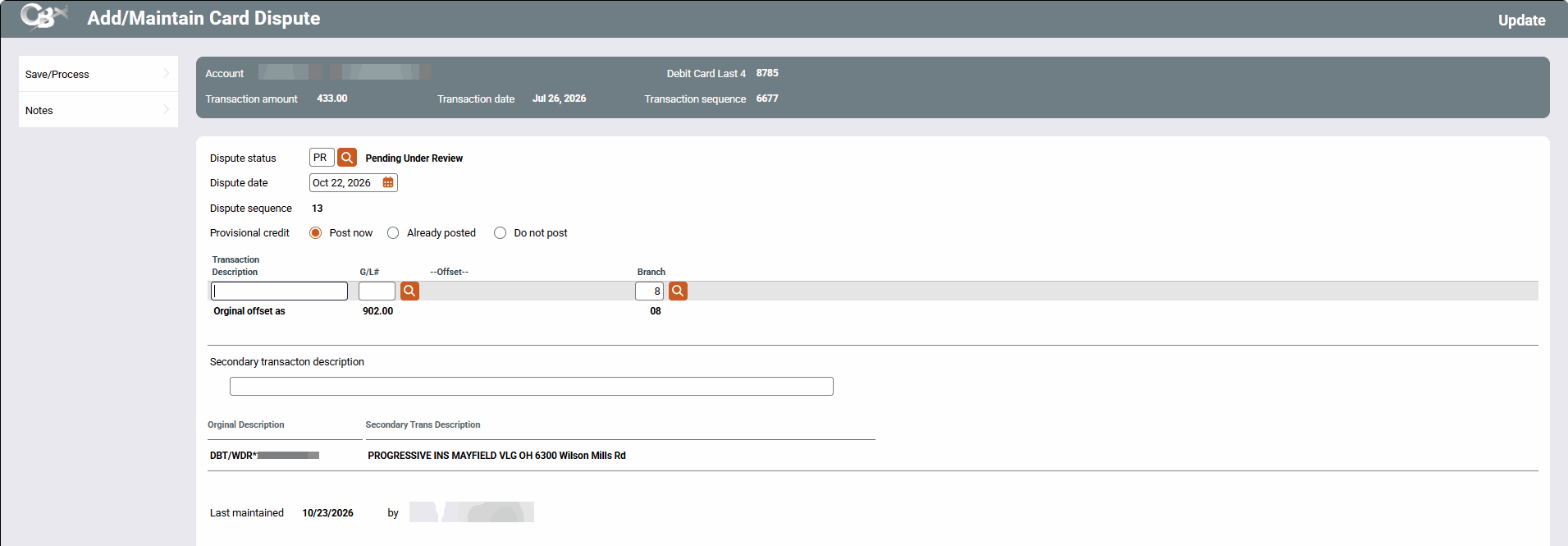
|
| Screen Title: | Add/Maintain Card Dispute | |
| Tool Number: | 1066 | |
| View full-size screen |
Access this screen by adding or maintaining a dispute from the chargeback dashboard.
Using this Screen
This screen is where you will add the information for the member chargeback, including the dispute status, date of the dispute, and any member notes.
Use Save/Process to save any changes and return to the dashboard.
Use Notes to enter any notes regarding the dispute.
Fields and Options
|
Option |
Description |
|---|---|
| Dispute status | This is the status of the dispute. This can be changed as the dispute moves through the stages of the chargeback process. Statuses are configured via Tool #1068 Chargeback Dispute Status Configuration |
| Dispute date | This will autopopulate the date adding the dispute, otherwise select a date from the calendar. |
| Dispute sequence | This is assigned by the system to create a record in the dispute files. |
| Provisional credit |
Select an option to post a provisional credit, or if one was already posted or should not be posted. If Post now is selected, use Enter to display additional fields to post the credit to the member and offset to the GL. Follow your credit union procedures here. The fields needed for the provisional credit posting will differ between debit and credit card transactions. |
| Original Description/Secondary Trans Description | Use these fields to verify that you are posting the dispute against the correct transaction. |