Member Personal Banker
| Screen ID: | UPERBNK-02 | 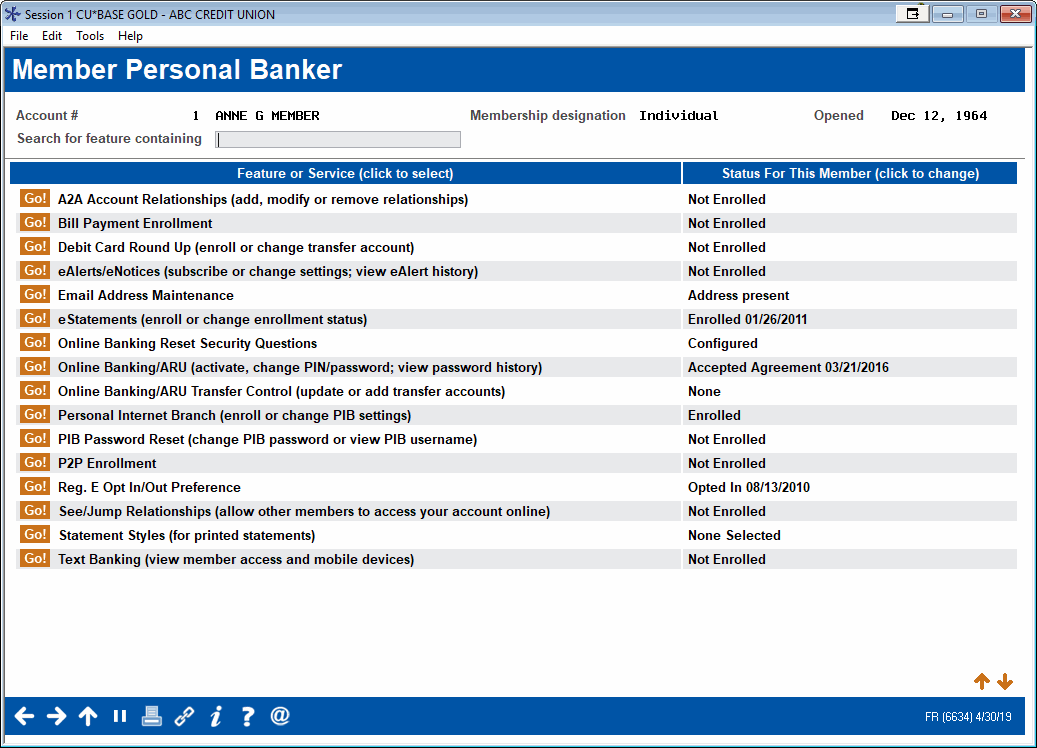
|
| Screen Title: | Membership Personal Banker | |
| Panel ID: | 6634 | |
| Tool Number: | 14 | |
| Click here to magnify |
Access this screen by entering an account in the previous screen and using Enter.

|
Get the member's perspective with this online banking video: Online Banking Overview (More videos below!) |
Helpful Resources
Learn how to update your credit union's default PIB settings.
Screen Overview
This screen is a central place for all of the personal banking options a member can request. Items are listed alphabetically to make them easier to find, and you can quickly scan the member’s current enrollment status and other relevant information listed next to each item. You can also reset a member's password to his online PIB Profile or the member’s security questions from this screen. Click an item on the list and Select.
Use the Search field at the top of the screen or scan an alphabetical listing of the items.
-
IMPORTANT NOTE: Are you not seeing something on your screen? You may need to activate the feature first. Additionally, some features that do not have an on/off configuration may be listed on your screen, regardless of whether you are using the feature.
-
A2A Account Relationships (add modify or remove relationships)
-
Bill Pay Enrollment (NOTE: For viewing bill pay status only. DO NOT use this screen to make enrollment changes unless you work with the Cards & Payments team.)
-
eAlerts/eNotices (subscribe or change settings; view eAlert/eNotice history)
-
Online Banking Reset Security Questions (Select this option to move to a confirmation screen to delete them. You will not be able to view the questions or the answers. Use Enter to clear them.)
-
Follow credit union policies and procedures. You can also remove security question answers using the selection below. Click the link below to learn more about security questions.
-
-
Online Banking/ARU (activate, change PIN/password; view password history)
-
Online Banking/ARU Transfer Control (update or add transfer accounts)
-
PIB password reset (change PIB password or view PIB username)
-
P2P Enrollment (NOTE: For viewing P2P status only. DO NOT use this screen to make enrollment changes unless you work with the Cards & Payments team.)
-
RDC Enrollment (NOTE: This also allows you to adjust limits at the member level, block the member from enrolling, and change the review settings for individual members.)
-
NOTE: If this access is blocked, it may be due to the fact that the membership designation of this membership is exempt from Reg E functionality. SEE ALSO: Membership Designation Configuration.
-
See/Jump relationships (allow other member access to your account online) (NOTE: The See feature is no longer available.)