Configuring Account Reason Codes (1)
| Screen ID: | U_NB-01 | 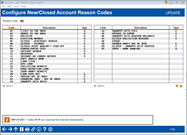
|
| Screen Title: | Configure New/Closed Account Reason Codes | |
| Panel ID: | 1596 | |
| Tool Number: | 551 | |
| Click here to magnify |
Access this screen by selecting "Update account reason codes" on the entry screen.
SEE ALSO: Why Use Reason Codes?
This the first of two screens used to set up codes that can be assigned to the MEMBERx account record for new accounts (or to the ACHISTx record for closed accounts) to record the reason why the member opened or closed the account.
-
The Type column indicates whether this code is associated with an open or close account process (O for Open and C for Closed). This code determines whether the code will appear in the lookup when selecting a Account Reason Code during the open or close process. (If the code does not have an assigned Type, it will appear in both lists.)
Enter a new or existing two-digit code, and use Enter to proceed to the second screen.
-
NOTE: To make analysis easier, we recommend that you use codes 01 through 40 for “open” reasons, and codes 41 through 89 for “close” reasons.
-
NOTE: A reason code is required in order to close an account, so be sure to configure at least one!"
-
NOTE: A reason code is required in order to close a membership, so be sure to configure at least one!"
-
IMPORTANT: Codes 90-99 are reserved for use by core internal transactions (such as online banking).
Related Topics
Opening or Updating a Membership: Misc. Info
Updating Membership and Account Reason Codes
Closing/Redeeming a Certificate Account
Helpful Resources
Where is Reason Code data stored in the core?