Loan Collateral Item Detail (Other)
| Screen ID: |
ULNCLA-D |
|
| Screen Title: |
Collateral Identification |
|
| Panel ID: |
2327 |
|
| Tool Number: | Multiple | |
| View full-size screen |
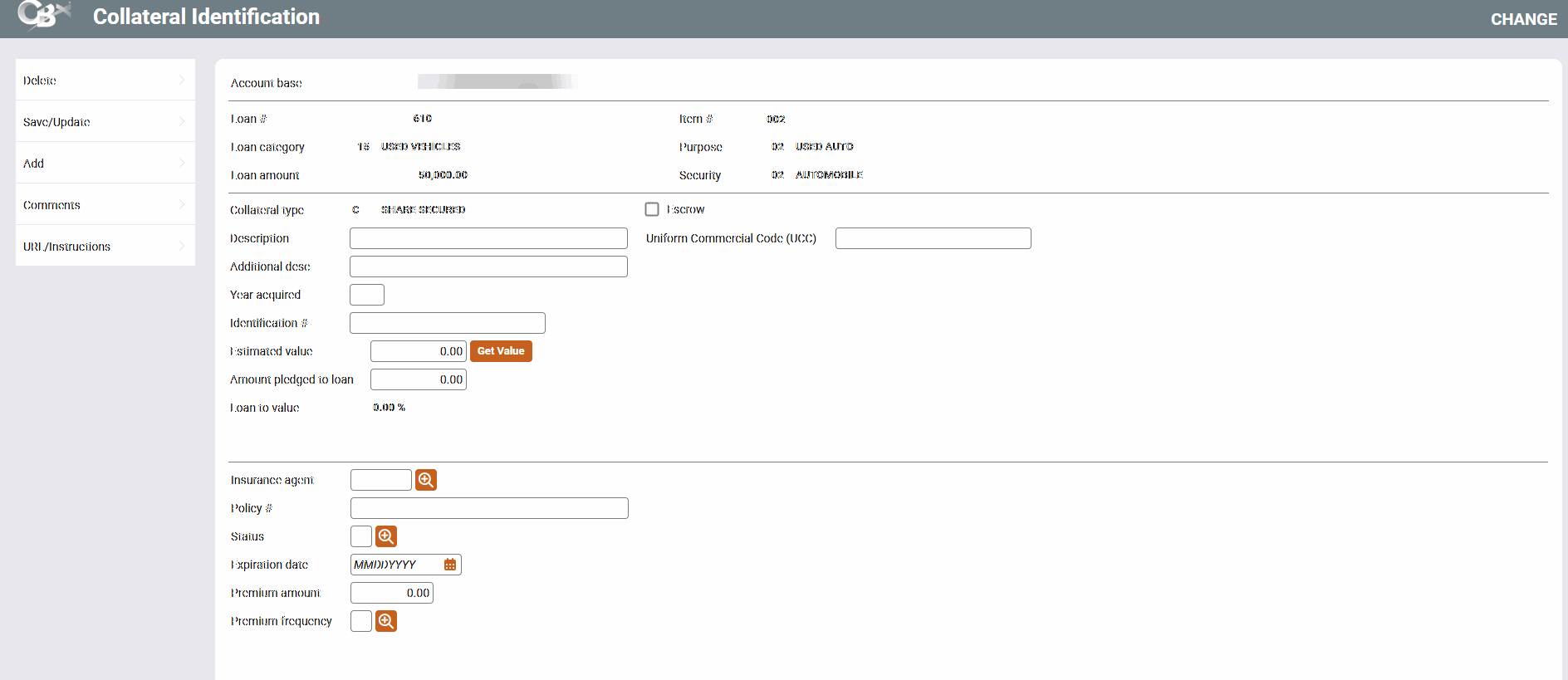
These screens are used to modify or view details about a collateral item attached to a loan account.
Screen Overview
This screen is used to modify or view details about Other (O) collateral item attached to a loan account. The fields available will vary depending on the type of collateral item being modified. (SEE ALSO: Collateral Types)
-
Use Comments to enter any miscellaneous information about this collateral item. (This button will appear highlighted if there are already comments.
-
Use HMDA Reporting to enter data to download for your (Home Mortgage Reporting Act) HMDA reporting.
When done, use Save/Update to save all changes and continue to the next step in the loan application or loan account maintenance process, or use Add to save and return to the Collateral Selection screen to add another new collateral item.
If you see asterisks on this screen, it is due to the privacy configuration.
Field Descriptions
|
Field Name |
Description |
|---|---|
|
Collateral type |
A code and description of the type of collateral, defined in system configuration. |
|
Description |
A description of the collateral item. For automobile or similar collateral types, use this field to enter the make of the vehicle (e.g., “Ford” or “Toyota”). |
|
Additional desc |
For automobile or similar collateral types, use this field to enter the model of the vehicle (e.g., “Taurus” or “Camry”). For stock collateral types, use this field any way you wish to describe the collateral being pledged. |
|
Year Acquired |
Enter the year acquired. Four digits. |
|
Identification # |
For automobile or similar collateral types, enter the Vehicle Identification Number (VIN). For other miscellaneous collateral types, this field could be used for a serial number or other identifying number. |
|
Estimated value |
The total estimated value of the collateral item.
|
|
Amt pledged to loan |
The amount of the collateral value which is pledged as collateral against the loan. This may be less than the Estimated Value for items such as stocks or bonds, when the entire item is not being used to secure the loan. The standard Loan Officer Worksheet prints a total of this amount for all collateral items. It is labeled “Estimated value of collateral” on the form. When setting up a stock-type collateral item, be sure to complete this field with the amount pledged according to the stock's current value. When the Stock/LOC Disb Value Adjustment feature is used, this amount will be adjusted if needed according to the current value of the stock from the configured stock type code. |
|
Loan to Value |
This is a calculated ratio using only this collateral item. Press Enter to refresh the calculation after changing the Estimated value. (Loan amount / Estimated value) * 100 = LTV% On the Loan Application Financial Summary screen as well as on the printed Loan Officer Worksheet, this ratio calculation will include the value of other collateral items tied to the loan as well. |
|
Escrow |
This checkbox will appear if the loan category is configured to allow for escrow accounts. If this checkbox is checked, an escrow account is attached to this loan account. |
|
Uniform commercial code (UCC) |
Optional. 20 characters alphanumeric. Stored in the collateral tables as Misc. identification number. |
|
Insurance agent |
The insurance carrier for the collateral item, if any. Click the lookup button
|
|
Policy # |
Enter the policy number of the insurance, if any. |
|
Status |
The status of the insurance. Click the lookup button
These are standard system codes (stored in file SYSCTL), not credit union-defined. |
|
Expiration date |
The insurance policy expiration date, if any. |
|
Premium amount |
The premium amount for the insurance, if any. |
|
Premium frequency |
The frequency of insurance premium payments, if any. Click the lookup button |
 to display the
Related Resources
Learn how to complete tasks related to opening a new loan.
Collateral: Tools for Tracking Property Securing Loans booklet